Solar USB Charger

Let’s make something super useful— your own solar powered USB backup battery! After some simple soldering, you’ll be ready to charge your phone and other portable electronics on the go while camping or during the next power outage. What follows is a basic recipe which you can follow exactly, or switch out the solar panel and battery size to match your desired capacity, charge speed, and budget.

This project is part of my free Solar Class, where you can learn more ways to harness the sun’s energy through engraving and solar panels.

To keep up with what I’m working on, follow me on YouTube, Instagram, Twitter, Pinterest, and subscribe to my newsletter.

What You’ll Need

Parts (Adafruit shopping list):

Tools:

As an Amazon Associate I earn from qualifying purchases you make using my affiliate links.

First soldering project? No problem! This is a great project for beginners, and you’ll get a variety of types of solder practice while building it. You can learn how in the soldering lesson of Randy’s free Instructables Electronics Class, then come back here to assemble your solar charger.

(more…)

3 Beginner Arduino Mistakes

In my decade of experience building with and teaching Arduino, I see three mistakes more often than any others. Beginners typically:

  1. bite off more than they can chew by attempting to build a project with too many elements at once,
  2. make incorrect assumptions during prototyping,
  3. and underutilize the resources available to them online.

Read more about each one in the tutorial that follows, including how to avoid making these mistakes yourself.

If you’re just starting out in Arduino, try my free Instructables Arduino Class! It’ll bring you up to speed on the basics and best practices, further enhancing your Arduino fun-to-frustrating ratio.

If you’ve got tips for beginners, we’d all love to hear about them in the comments!

(more…)

Pi Camera Tumblr GIF-Maker

I wanted a way to use my vintage cameras in a new, digital way. I have a few kicking around in various conditions, but haven’t used them in ages because the film is costly to develop. Follow along with this Instructable to see how I put a Raspberry Pi and Pi Camera inside a retro film camera, and programmed it to upload GIFs to my Tumblr.

In my desire to capture more GIFs (and b-roll of using it) and discover the remaining bugs before publishing the tutorial, I took it to Maker Faire NY today, published the Instructable soon after. 

The code is based on Lara’s free Instructables Raspberry Pi Class, which contains valuable background info if you’re new to electronics, programming, or the Pi. If you have some Pi experience, you may appreciate the Pi Tumblr GIF Photobooth Instructable, which is a more concise overview of the class content. The same code can be used to run a photo booth at your next party! I chose to take my camera mobile with a big battery pack to capture GIFs at Maker Faire NY this year.

This Target Brownie Six-20 is a 40s camera, and it was pretty dirty and didn’t take great photos, so I don’t feel bad about gutting it. I’d think twice about cutting and drilling through some other members of my collection. If you take this on, be sure you’re comfortable disabling your camera’s ability to shoot film, as my methods are a bit destructive.

For this project, you will need:

To keep up with what I’m working on, follow me on YouTube, Instagram, Twitter, Pinterest, and subscribe to my newsletter. As an Amazon Associate I earn from qualifying purchases you make using my affiliate links.

I used the Raspbian operating system for this project, which includes Python 2, but you’ll need to install some packages using the following lines of code in your Pi’s terminal window in order to run the script:

sudo apt-get install imagemagick
sudo apt-get install mpg321 -y
sudo apt-get install python-RPi.gpio python3-RPi.gpio
sudo pip install pytumblr
(more…)

Diffused LED Strip Sign With Arduino/Bluetooth

I created this sign for the DJ booth at the 8th annual Interactive Show at my local hackerspace, NYC Resistor. The theme this year was The Running Man, the chintzy 1987 sci-fi movie, which takes place in the year 2017. The sign is built from foam core board and the pixel strip inside is diffused with plain printer paper. The sign’s colors and animations can be controlled with a phone/tablet app over bluetooth.

This guide details the construction, programming, and use of this simple sign using Arduino and the Adafruit Feather Bluefruit 32u4 microcontroller and its companion Bluefruit LE Connect app for iOS/Android. You could easily scale back the wireless control aspect and use an Arduino Uno and a physical switch to change the animation, as in my free introductory Arduino Class, or control the sign from the internet by switching the microcontroller for a wifi board like the Feather Huzzah ESP8266, which you can learn to do in my free Internet of Things Class.

Supplies

To keep up with what I’m working on, follow me on YouTube, Instagram, Twitter, Pinterest, and subscribe to my newsletter. As an Amazon Associate I earn from qualifying purchases you make using my affiliate links.

(more…)

Internet Valentine w/ ESP8266

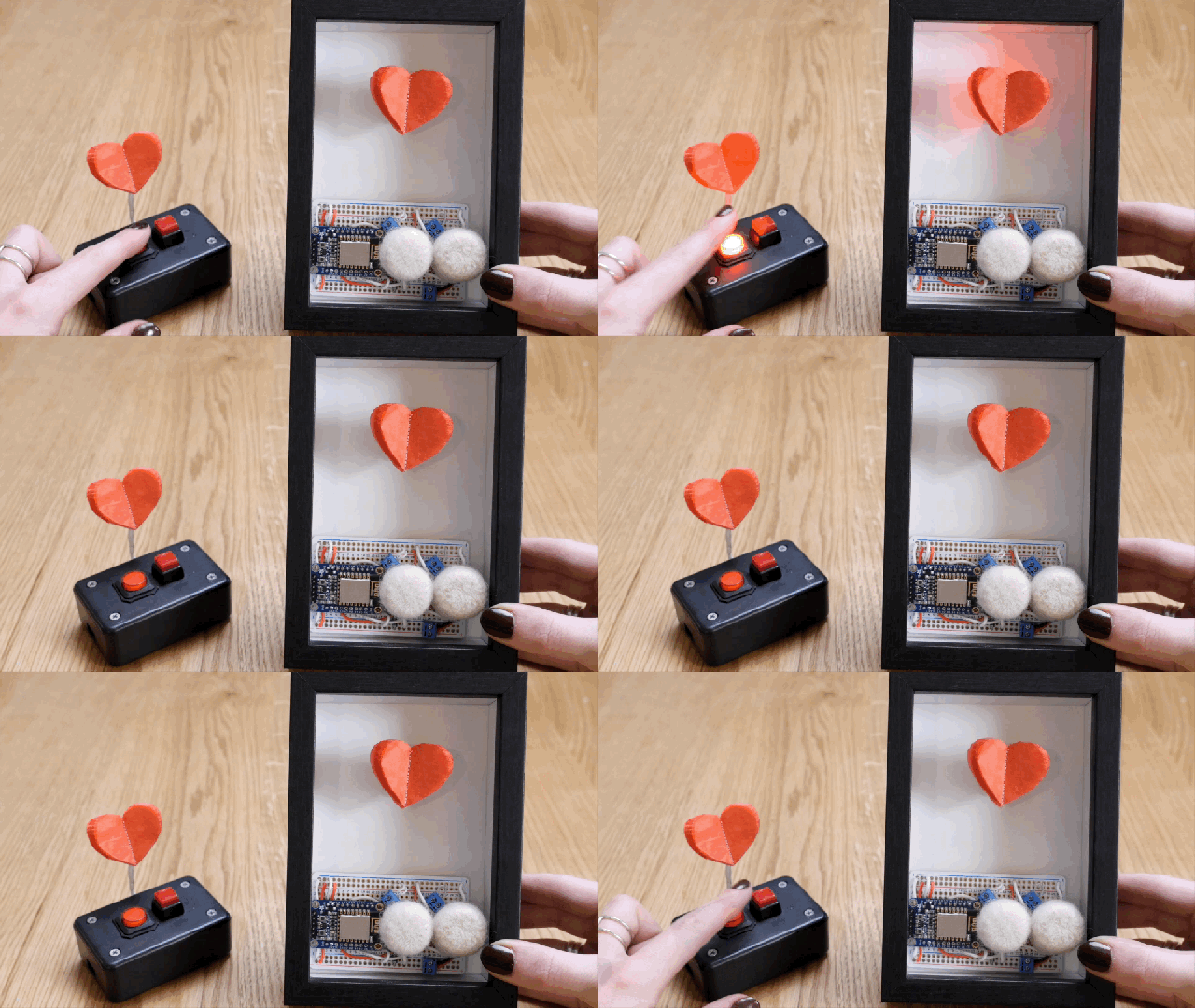
Send your valentine a note through the net! This DIY electronics project uses a small vibrating motor to gently wave a tissue paper heart and flash an LED when it receives instructions over the internet from another device. I built two versions of the ESP8266 wifi circuit, also equipped with two buttons for triggering the two commands. The devices talk over the Adafruit IO cloud data service to communicate with each other from anywhere with wifi, and I’ll show you how to activate your valentine with the API gateway service IFTTT as well, in case you only want to build one valentine circuit.

This is a pretty easy Internet of Things project! Before you dive in, you should have a workable knowledge of the Arduino software and electronics soldering. Try my beginner Arduino Class and/or Randy Sarafan’s basic Electronics Class to get up to speed!

What You’ll Need

For this project I created two devices that communicate with one another, but this project works fine with just one device, triggered over the internet with your phone or computer (we’ll cover that later). Regardless of the number of transceivers you’re making, I highly recommend creating one solderless breadboard prototype and duplicating it with a new set of parts in soldered form, rather than disassembling the working prototype. It makes building and troubleshooting the final board much easier.

For each device:

Gather the following tools:

Create/log in to accounts on the following sites:

(more…)