Hunter Cat Card Skimmer Detector Review

Today I’m reviewing Hunter Cat, a business-card sized circuit designed to root out magnetic card skimmers. Thieves use skimmers to collect your bank card information, most commonly at ATMs and gas stations.

Dip the Hunter Cat into a magstripe payment device and it will tell you with some small LEDs whether it’s safe to dip your bank card.

It works by detecting the number of magnetic stripe heads inside the reader. Too many and the Hunter Cat will tell you it’s suspicious.

I keep my Hunter Cat in the dash compartment on my scooter, since I’m most likely to need it when I’m getting gas, but if I were traveling, I’d carry it with me to identify safe ATMs.

Hunter Cat is a collaboration between Mexican hardware company Electronic Cats and security researcher Salvador Mendoza.

(more…)

Meow Meow Mini: First Look

Today I want to introduce you to a new board, the Meow Meow Mini. It’s basically a capacitive touch keyboard, which makes it easy to turn any almost anything into a controller for games and other apps.

Meow Meow is created by my friends at Electronic Cats, a Mexican open source hardware company headquartered in Aguascalientes.

(more…)

Electronic Affirmation Mirror

Written for HackSpace magazine issue 30

When you look in the mirror, who couldn’t use a few words of encouragement? Build a display inside a mirror to scroll custom affirmations you can read over your own reflection. This polished project comes together easily with a store-bought shadow box frame and some see-through mirror material. You can build a simple version with a basic Arduino or compatible, or level it up using a NodeMCU (ESP8266 WiFi board) in order to add more positive quotes to the mirror over the internet.

For this project, you will need:

Read the full tutorial on HackSpace.

(more…)

Cat Food Access Control with ESP8266

This project goes over the process I used to create an automated cat food bowl, for my elderly diabetic cat Chaz. See, he needs to eat breakfast before he can get his insulin, but I often forget to pick up his food dish before I go to bed, which spoils his appetite and throws off his insulin schedule. This dish uses a servo motor to close a lid over the food between the hours of midnight and 7:30am. The NodeMCU ESP8266 microcontroller’s Arduino sketch uses Network Time Protocol (NTP) to control the schedule.

This project may not be suitable for younger, more active cats. Chaz is so old and frail, he isn’t inclined to try to pry the bowl open, but it is possible.

Tutorial: https://www.instructables.com/id/Cat-Food-Access-Control-ESP8266-Servo-Motor-3D-Pri

If you’re new to the Arduino or the ESP8266, you may enjoy the following prerequisite guides:

Supplies:

To keep up with what I’m working on, follow me on YouTubeInstagramTwitterPinterest, and subscribe to my newsletter. As an Amazon Associate I earn from qualifying purchases you make using my affiliate links.

3D Printed Parts

The cat food bowl holder is based on Ardy Lai’s design on Thingiverse. I made it bigger to accommodate my cat’s bowl, and also made it shorter since scaling it up had made it too tall. I added a holder for a micro servo motor, and a couple of holes for cables to route to the inside.

File on Tinkercad: https://www.tinkercad.com/things/49HoW04XYVq-cat-food-access-control-bowl

I modeled a simple lid using Tinkercad, designed to attach to the horn of the micro servo. You can grab my design directly from Tinkercad, and/or download the STLs attached to this step.

I printed the parts on my Creality CR-10s Pro printer with gold PLA filament.

(more…)

Emergency USB Power Supply (3D Printed)

This project makes use of a 12V battery, like you would use for a vehicle, for charging USB devices in case of a power outage or camping trip. It’s as simple as affixing a USB car charger to the battery. After Hurricane Sandy, I was without power and used an inverter/battery setup at home, but it was huge and heavy. This project revisits the concept with a smaller battery (meant for motorcycles/ATVs) and DC-only charging.

I’ve also created an optional 3D printed battery topper to cover the battery contacts and hold the USB ports. The design is available on Tinkercad so that you may modify it to fit your specific battery and USB charger.

The compact design makes it easier to transport and store. There are many situations where this device could be useful:

  • power outage
  • camping
  • off-grid living

Supplies:

(more…)

Silver RFID Ring

This guide will demonstrate how to make a silver ring that holds a glass RFID tag. It’s the same kind folks get implanted in their hands to unlock things like door, computers, or vehicles. I’m not quite brave enough to get the implant but I do like making jewelry and wearing rings, so this solution is perfect for me.

I got these tiny glass ampoule tags and RFID reader from Trossen Robotics– they are the daintiest tags I could find. Normally when mounting a stone on a ring, it’s surrounded on at least one side by metal. I was worried the standard bezel would impact the tag readability, so I wanted to create a design that would allow the most possible open space around the tag. I prototyped the design without a tag, just to see how comfortable it was before scaling up to add the extra pieces and figure out the construction.

I got these tiny glass ampoule tags and RFID reader from Trossen Robotics– they are the daintiest tags I could find. Normally when mounting a stone on a ring, it’s surrounded on at least one side by metal. I was worried the standard bezel would impact the tag readability, so I wanted to create a design that would allow the most possible open space around the tag. I prototyped the design without a tag, just to see how comfortable it was before scaling up to add the extra pieces and figure out the construction.

Prerequisite guides:

To keep up with what I’m working on, follow me on YouTube, Instagram, Twitter, Pinterest, and subscribe to my newsletter.

Supplies:

To make this project, you will need:

As an Amazon Associate I earn from qualifying purchases you make using my affiliate links.

(more…)

Translate an Idea into Arduino Code

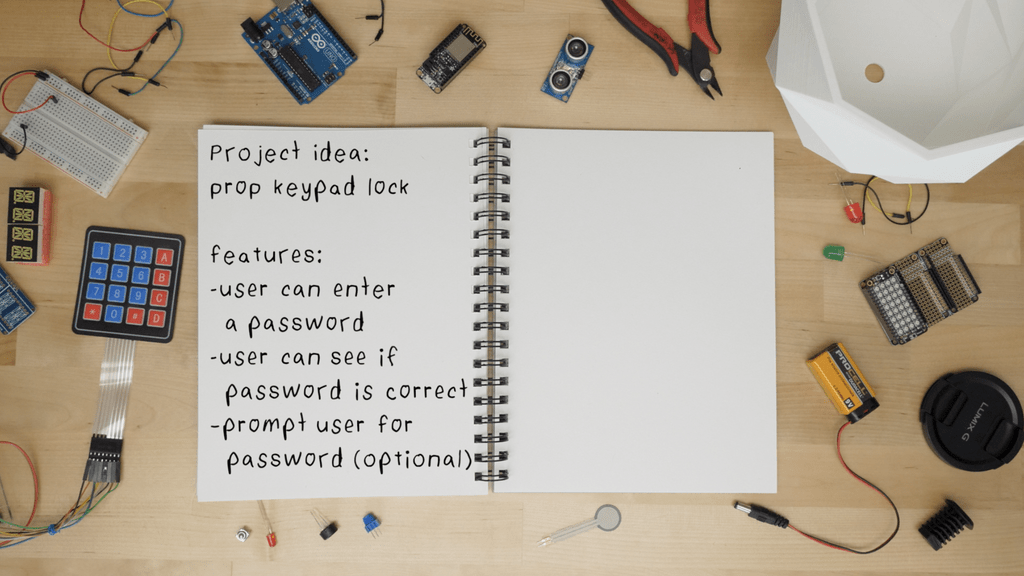
This tutorial walks through the process of combining Arduino sample sketches to make a working project prototype. Developing the code for your project can be the most intimidating part, especially if you haven’t done it a thousand times already.

If you’re a total Arduino newbie, try my free Arduino Class.

To keep up with what I’m working on, follow me on YouTube, Instagram, Twitter, Pinterest, and subscribe to my newsletter. As an Amazon Associate, I earn from qualifying purchases you make using my affiliate links.

Let’s dive in!

Define the Purpose

First, and this may seem obvious, but write out the main purpose of the project idea. If it has multiple functions, decide which features are needed versus those that would be nice but aren’t necessary at first. See also my previous tutorial about common Arduino mistakes including biting off more than you can chew. Keep it simple at first; you can always add to it later.

(more…)

Glowing Eyes Costume

Twin Jawas! Double Orko! Two ghost wizards from Bubble-Bobble! This costume hood can be any LED-eyed creature you choose just by changing the colors. I first made this project in 2015 with a very simple circuit and code, but this year I wanted to create an upgraded version with simultaneous animation control across two costumes. This circuit uses one simple, close-range RF remote to control two receivers on the same frequency, and Arduino code employing interrupts to achieve responsive animation changes, based on Bill Earl’s tutorial code.

For this project, you will need:

To keep up with what I’m working on, follow me on YouTubeInstagramTwitterPinterest, and subscribe to my newsletter. As an Amazon Associate I earn from qualifying purchases you make using my affiliate links.

(more…)

Scooter Underglow

Join me in creating ground effect lighting for my scooter using a bluetooth microcontroller and addressable LED strip.

For this project I’m recycling two bits of pixel strip leftover from my old POV bike project tutorial. These are APA102s or DotStars, but you could totally use Neopixels for this project, I just happened to have this set of two strips wired in parallel, which is perfect for sticking under my scooter.

For this project you will need:

To keep up with what I’m working on, follow me on YouTubeInstagramTwitterPinterest, and subscribe to my newsletter. As an Amazon Associate I earn from qualifying purchases you make using my affiliate links.

Legal disclaimer! The automotive underglow lighting laws where you live may prohibit some or all colors/animations– where I live, only solid white is technically allowed, and I don’t drive with any other colors/patterns in traffic. Never use flashing lights in the colors emergency vehicles use!

(more…)