Glowing LED Gummy Candy

Let’s make glowing gummy candies that look like LEDs! The recipe for gummy candy is simple, the legs are 3D printed, and the special ingredient to make the candies glow under blacklight is vitamin B2 powder.

For this project, you will need:

As an additional experiment, we’ll add real surface mount LEDs to the inside of some of the candies.

Warning! Coin cell batteries can cause serious injury if swallowed. Keep coin cell batteries out of reach of small children!

(more…)

LED Mason Jar Lanterns

In this easy 3D printing project, we’ll build glowing mason jar lanterns containing a simple LED and battery circuit. Download my file or build your own custom lid using the Glow Circuit Assembly in Tinkercad, which is designed to hold the battery and LED together perfectly. I’ll show you four different ways to style your lanterns using materials you probably already have around.

This is a beginner project that’s great for students/educators. Let’s begin!

For this project, you will need:

  • Mason jar(s) in size(s) of your choice (quart, pint, 4oz)
  • 10mm LED(s) in color(s) of your choice
  • CR2032 batteries
  • Wire cutters/snips
  • 3D printed lid with embedded Glow Holder in size(s) to match your jar(s)
  • Paper & scissors, glitter glue, translucent beads, etc. for decorating your jar
  • Calipers or a ruler (optional, for designing your own lid)

Make a copy of my Tinkercad file (free account/login required). The two sizes match the common mason jar lid sizes. Export the one(s) that match your jar(s) and send them to your 3D printer. I used Autodesk Print Studio to prepare the printer file and set it to 20% infill with no raft or supports. If you prefer to design your own lid, skip ahead to the design step.

To keep up with what I’m working on, follow me on YouTube, Instagram, Twitter, Pinterest, and subscribe to my newsletter. As an Amazon Associate I earn from qualifying purchases you make using my affiliate links.

(more…)

Social Stats Tracker for Twitter, Instagram, Instructables

Frame your followers! Here’s how to build a social media stats tracker display using the a wifi arduino-compatible ESP8266 microcontroller board and several seven-segment displays. This project is an extension of my YouTube Subscriber Counter project, but uses one “brain” to track and display multiple networks. Easily omit the left (large digits) displays for any stat under 10k to bring the cost of components down.

Before attempting this project, you should be generally familiar with uploading new programs to your Arduino board and installing code libraries, both of which you can learn for free in my Arduino Class, though you really don’t have to understand much of the actual Arduino code to get this project running.

For a more in-depth introduction to the ESP8266 board (and its installation and setup), check out my free Internet of Things Class.

Supplies

For this project, you will need the following materials:

and the following tools:

To keep up with what I’m working on, follow me on YouTube, Instagram, Twitter, Pinterest, and subscribe to my newsletter. As an Amazon Associate I earn from qualifying purchases you make using my affiliate links.

(more…)

YouTube Subscriber Counter With ESP8266

Version 2 of my YouTube Subscriber counter is here and it goes to eleve– I mean 99999999!

I was inspired by the Play Button awards YouTube sends out for subscriber milestones and built this circuit to display my realtime subscriber count using an ESP8266 wifi board and seven-segment display. I built this one to celebrate surpassing 10k subscribers, so this is an upgrade to my previous counter, which only supports counts up to 9999. Personalize the code to work with your channel! For tracking other social media stats, check out my multi social tracker project.

Before attempting this project, you should be generally familiar with uploading new programs to your Arduino board and installing code libraries, both of which you can learn for free in my Arduino Class, though you really don’t have to understand any of the actual Arduino code to get this project running.

For a more in-depth introduction to the ESP8266 board (and its installation and setup), check out my free Internet of Things Class.

For this project, you will need the following materials:

and the following tools:

(more…)

Diffused LED Strip Sign With Arduino/Bluetooth

I created this sign for the DJ booth at the 8th annual Interactive Show at my local hackerspace, NYC Resistor. The theme this year was The Running Man, the chintzy 1987 sci-fi movie, which takes place in the year 2017. The sign is built from foam core board and the pixel strip inside is diffused with plain printer paper. The sign’s colors and animations can be controlled with a phone/tablet app over bluetooth.

This guide details the construction, programming, and use of this simple sign using Arduino and the Adafruit Feather Bluefruit 32u4 microcontroller and its companion Bluefruit LE Connect app for iOS/Android. You could easily scale back the wireless control aspect and use an Arduino Uno and a physical switch to change the animation, as in my free introductory Arduino Class, or control the sign from the internet by switching the microcontroller for a wifi board like the Feather Huzzah ESP8266, which you can learn to do in my free Internet of Things Class.

Supplies

To keep up with what I’m working on, follow me on YouTube, Instagram, Twitter, Pinterest, and subscribe to my newsletter. As an Amazon Associate I earn from qualifying purchases you make using my affiliate links.

(more…)

Modern Wifi Weather Display with Arduino & ESP8266

Every morning when I get ready to walk the dog, I want to know what the weather is like outside. Is it raining? Cold enough for the dog’s sweater? From my current NYC apartment, it’s even hard to tell if I’ll need sunglasses when I step outside. I usually use my phone for checking the weather, but wouldn’t it be nice to have some wall decor that provides this info at a glance?

I built this IoT weather display using a small shadow box, some RGBW NeoPixel LEDs, and an Adafruit Feather Huzzah ESP8266 with seven-segment display FeatherWing. Weather data is tracked using IFTTT, an incredibly rich (and free ) API gateway, which sends data to the cloud service Adafruit IO, which is then accessed by the Arduino program running on the microcontroller.

Before attempting this project, you should be familiar with Arduino, and you can take my free Arduino Class, or Randy’s LEDs & Lighting Class or Electronics Class if you need to brush up on any of the basic skills.

For this project, you will need:

To keep up with what I’m working on, follow me on YouTubeInstagramTwitterPinterest, and subscribe to my newsletter. As an Amazon Associate I earn from qualifying purchases you make using my affiliate links.

As an alternative to the Feather Huzzah, you can also use the NodeMCU board (USB programmable) or Huzzah ESP8266 breakout, for which an FTDI cable is required to upload new programs (use the standard 7-segment backpack rather than the FeatherWing version).

(more…)

Internet Valentine w/ ESP8266

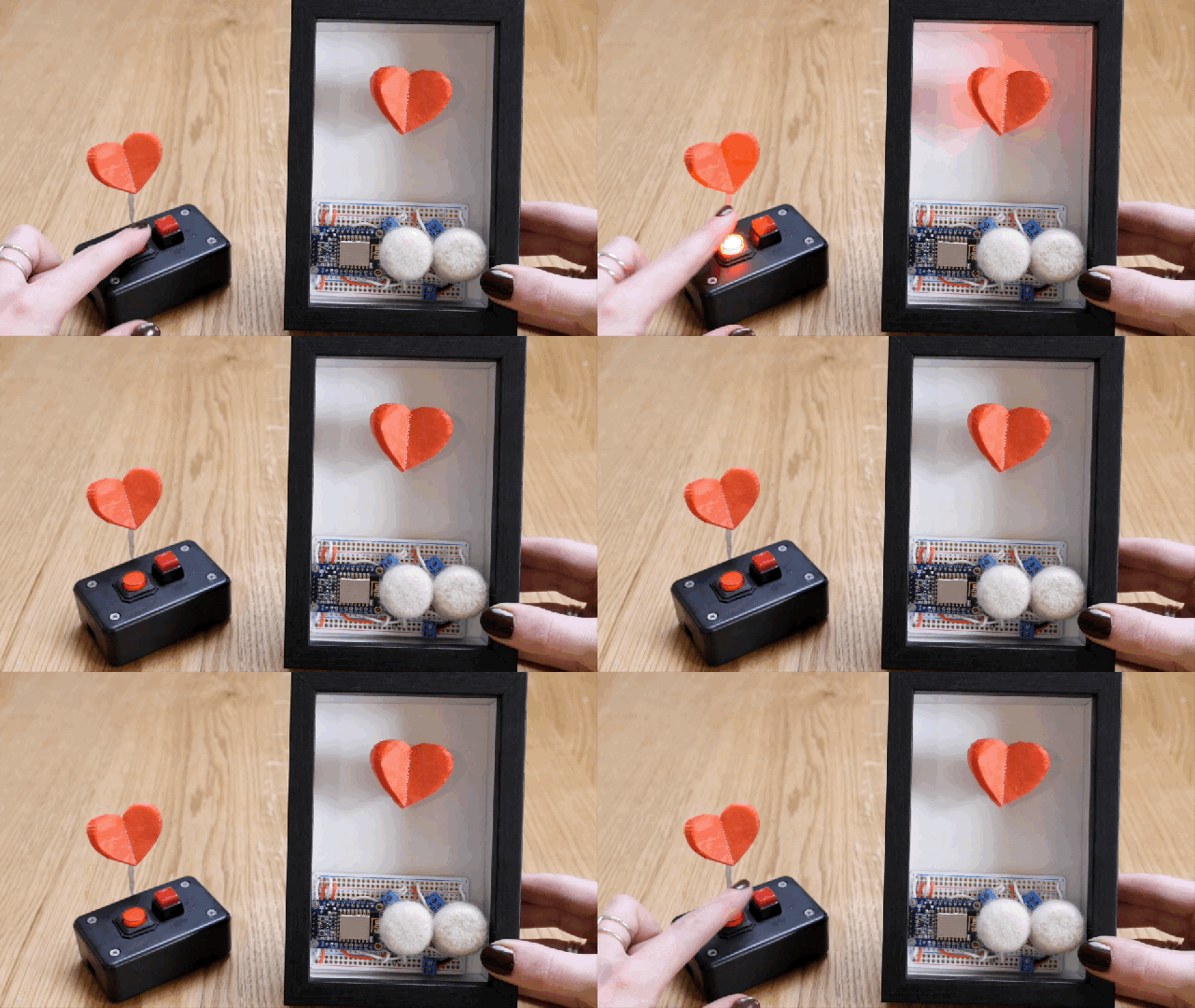
Send your valentine a note through the net! This DIY electronics project uses a small vibrating motor to gently wave a tissue paper heart and flash an LED when it receives instructions over the internet from another device. I built two versions of the ESP8266 wifi circuit, also equipped with two buttons for triggering the two commands. The devices talk over the Adafruit IO cloud data service to communicate with each other from anywhere with wifi, and I’ll show you how to activate your valentine with the API gateway service IFTTT as well, in case you only want to build one valentine circuit.

This is a pretty easy Internet of Things project! Before you dive in, you should have a workable knowledge of the Arduino software and electronics soldering. Try my beginner Arduino Class and/or Randy Sarafan’s basic Electronics Class to get up to speed!

What You’ll Need

For this project I created two devices that communicate with one another, but this project works fine with just one device, triggered over the internet with your phone or computer (we’ll cover that later). Regardless of the number of transceivers you’re making, I highly recommend creating one solderless breadboard prototype and duplicating it with a new set of parts in soldered form, rather than disassembling the working prototype. It makes building and troubleshooting the final board much easier.

For each device:

Gather the following tools:

Create/log in to accounts on the following sites:

(more…)

Moon Secrets LED Jacket

I had the opportunity to build an LED jacket for Buzz Aldrin to wear in a segment on The Late Show with Stephen Colbert.

Have you been to the moon? Do you know what secrets it holds? I was invited to construct an LED space uniform jacket for Buzz Aldrin to wear in a segment on The Late Show with Stephen Colbert. It’s a fairly straightforward NeoPixel and LED sequin project and I thought you might like to learn how to build something similar at home.

Before you begin, you may wish to check out these helpful prerequisites:

Photo with Stephen by Derek Moreno, wardrobe supervisor for The Late Show

To create an illuminated jacket with NeoPixel motif and LED sequin emblem, you will need some sewing supplies and some electronics supplies from Adafruit. I made a parts wishlist and link individually to them here.

Parts & Expendables:

Tools:

(more…)

LED Matrix Snowflake Sweater with Bluetooth Control

Create a tacky sweater controlled by your phone! It’s easy to put together this Bluefruit and NeoPixel matrix circuit to display snowflakes in a sweater, and control the animation and color using the Adafruit Bluefruit LE Connect app for iOS or Android. 

This is an easy project to build but probably not best for a “first project” as there are a lot of concepts being mixed together and the matrix can use quite a lot of power. You can build it with any of our Bluefruit products and the microcontroller of your choice, such as FLORA with its BLE module, or the all-in-one Feather 32u4 Bluefruit LE.

Before you begin, read and understand the following prerequisite guides:

For this project you will need:

(more…)