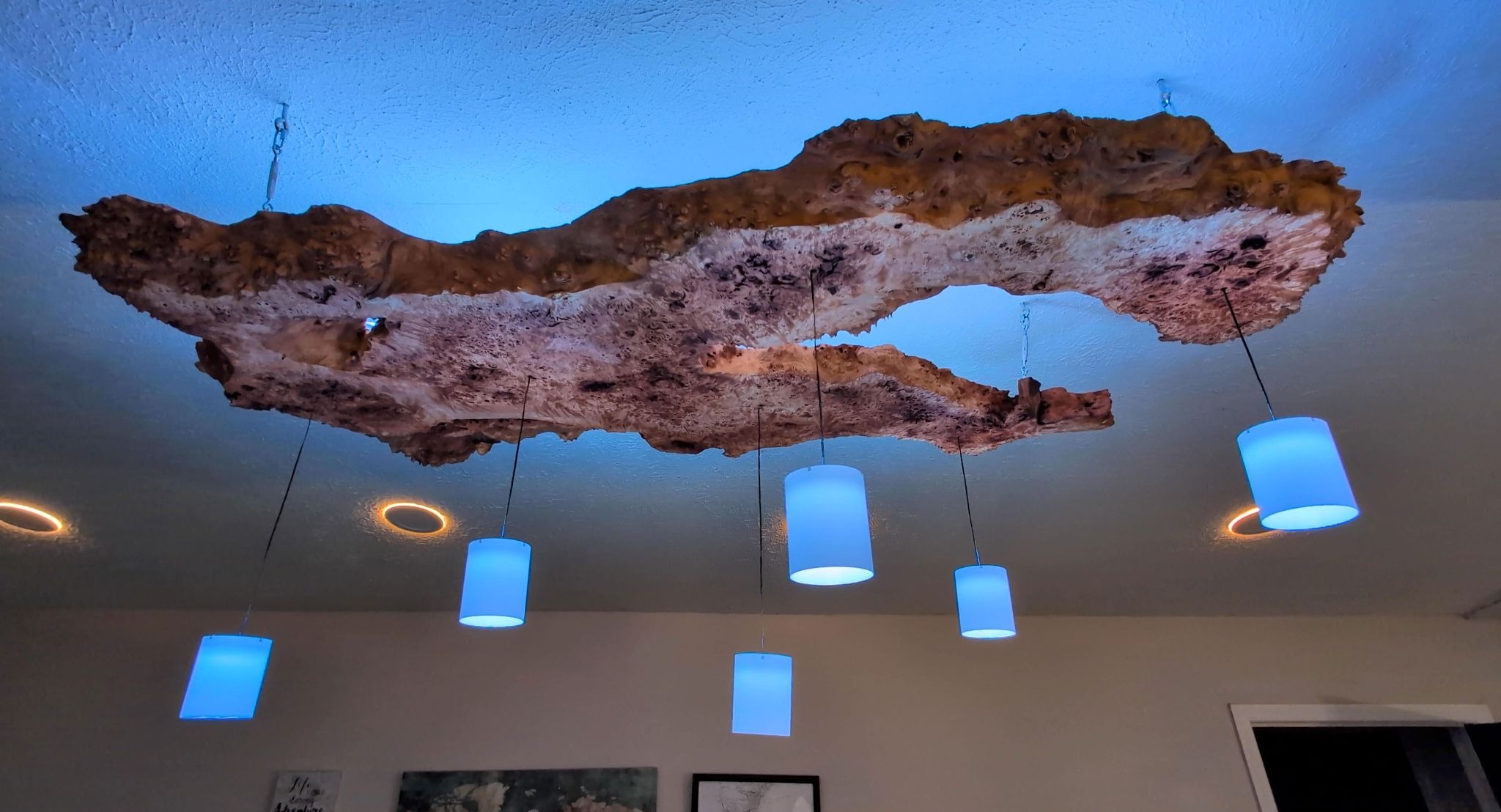
Today, we’re building a wood slab chandelier that’s way smarter than your average light fixture. This project is a collaboration with James Wright, who approached me with the idea of turning a gorgeous wood slab into a one-of-a-kind ceiling-suspended lighting fixture. We agreed on a concept with LED strip pointing up to spread light across the ceiling, and a few pendants hanging from the slab to provide downward room lighting and also highlight the grain of the slab.
Definitely check out his video to see how he transformed the raw slab into the foundation for our lighting fixture.
Today I’m sharing a super fun project that I collaborated on with a bartender friend of mine. He asked me to make a set of illuminated mushroom drink menus inspired by Alice in Wonderland. The idea is that he presents a mushroom, and when the recipient lifts the cap, text is revealed, letting them know which drink they are about to get. I modified Wuguigui’s free mushroom desk lamp files and added a battery-powered LED circuit to create this easy glowing 3D printing project.
The mushroom lamp design on Printables had to be modified because it uses an incandescent light fixture, but it’s such a lovely design that I chose to build on top of it rather than recreate something similar. The white dots are printed separately from the top dome, and the two main pieces screw together with their integrated threads.
Electronics and Taxidermy! That’s what’s on the menu for this diorama project collaboration between Emily Graslie and me. In this project, we will build a plywood diorama box and fill it with cityscape features like a brick wall with a dryer vent and LED lighting. Oh, and rat taxidermy. You’d be surprised how much overlap in tools there can be. Check out how many of the tools we need are carried by DigiKey!
Here’s how I made four LED poles for a recent art performance here in New York City.
Requirements
The project brief, as it was pitched to me, was to create four tall uprights for the corners of an eight-foot by eight-foot raft. They needed to be quick to deploy and start up the animation on their own after a five-minute countdown timer. And just in case anything were to fail, the show must go on without human intervention, so they needed to have as much redundancy as possible built into the design. So I came up with a set of four independent circuits, one on each pole, each containing a strip of pixels that will go up the pole and then over to the top of its neighbor, with some slack to drape in between the uprights. It’s like an LED huppah. Oh, and I had one week before the show to build everything, so this is a speed project.
I built a flexible screen in the form of a beaded curtain encrusted with LEDs that I control remotely. I’ve had this project on my list for quite some time, and the idea is simple: run lots of LEDs in vertical strips, enough to form a curtain.
In this post, we’ll be crafting an eye-catching painting that incorporates LEDs. This project is easily customizable to suit any decor theme, making it a great group activity.
You’ll need a canvas that’s stretched, so you have direct access to the back of the fabric, which will diffuse the light. Other solid types of painting surfaces won’t let the light through.
You’ll also need some acrylic paint, brushes, something to protect your work surface, and your choice of addressable LED pixels, whether it be a strip, rings, singles, or whatever your preference.
Instructions
To design your painting, you can arrange the canvas pixels and sketch the outline around them. For my artwork, I am sketching flowers.
After sketching the outline, I’m using black paint to fill in the design. It’s important to let the paint dry thoroughly before adding any electronics.
In the live stream, I connected the first NeoPixel ring to a microcontroller and attached it to the back of the canvas using hot glue. My cohost, Allie Weber, crafted her own adorable version of the painting project.
Following the live stream, I created a more stable version of the circuit using a solder-type breadboard. I connected the pixel’s power, ground, and data input to a microcontroller (in my case, an Arduino Micro).
Afterwards, I proceeded to attach more pixels to the chain using small gauge stranded wire, and then powered up the pixels using some library sample code uploaded to the Arduino. I flipped over the painting to align the pixels with the artwork before securing them in place with hot glue. To speed up the cooling process, I used canned air before repeating the procedure with additional pixels.
You can see the circuit diagram for my painting below.
Once the circuit is fully assembled, you can touch up the artwork using a little more paint if necessary. To power the circuit, I am using an old USB phone charger.
In Nate’s original guide, he demonstrates how to use pixel strip by folding it in half and positioning it upright and perpendicular to the painting. The hot glue is used as light pipes to achieve nicely diffused light and allow for two different colored regions to be placed in close proximity to each other.
The finished painting makes a great night light that’s totally unique. Give this one a try, and please share what you made!
Today we’re building an LED kaleidoscope. This 3D-printed project comes together with no glue or fasteners and contains wireless LEDs to create fun patterns. The inductive power coil lives in the base.
I didn’t design this kaleidoscope – My friend Debra Ansell from Geek Mom Projects did. You can check out her tutorial to see more information about this project, access the files to make your own, or browse Debra’s other projects. You can also follow her on social media @geekmomprojects.
This year I pulled This Old Tony‘s name for Makers Secret Santa. I was inspired by Tony’s love of benders and bending, and built him a toy from my childhood in the shape of a letter T. It’s got a magnetic spinning device that rides along the wire, and these little bends provide a turnaround point so you can, with practice, get the spinner to move continuously along the track.